Block letters generator: copy & paste
Write your text, tap a style
𝗭𝗼𝗲̈ ✨ 𝐩𝐡𝐨𝐭𝐨𝐠𝐫𝐚𝐩𝐡𝐞𝐫 in 𝘼𝙪𝙨𝙩𝙞𝙣 · ᴘᴏʀᴛʀᴀɪᴛs, 𝕨𝕖𝕕𝕕𝕚𝕟𝕘𝕤 & 𝓉𝓇𝒶𝓋ℯ𝓁, goosebumps 𝗴̹̄̄𝘂̼̹̐𝗮̹𝗿̹̑𝗮̼̺̺𝗻̓𝘁̑𝗲̍𝗲̹̐𝗱̹̒
In the full editor: several lines, emojis & symbols, all styles, Zalgo, punchlines, saving, and more… — no ads.
Try ETeext →What block letters look like
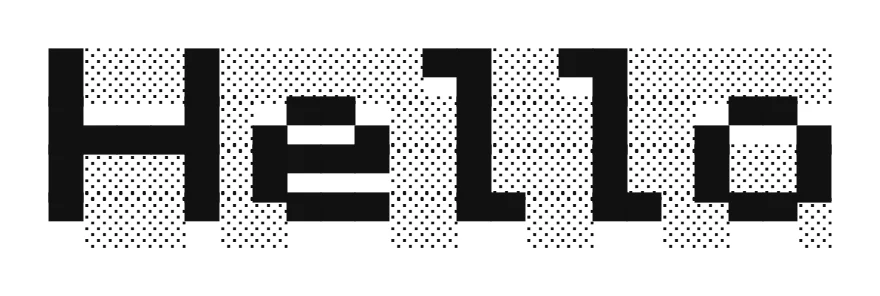
Create block letters in seconds: type your text and ETeext turns it into Unicode you copy and paste anywhere. You see exactly what you get before pasting.
Unlike every other style, Blocks does not swap one letter for another — it draws your word with small squares, across four lines, or five when the word carries accents. The output is still ordinary text you can copy and paste, but it takes up room: a six-letter word runs to well over a hundred characters. Keep it short. To be read on a phone, stay around four letters: in our tests, Facebook in a phone browser broke the lines past about 24 columns, and a five-letter word can already go beyond. A long word will break apart where the lines get cut. Think of it as a banner or a signature, not a sentence. “Café” is exactly as wide as “Cafe”. The pixel look is a nod to the block-built worlds of video games — Minecraft first among them — and the alphabet was drawn letter by letter for ETeext. Latin alphabet only: on Cyrillic, Devanagari or Greek, Blocks draws nothing at all.
Android and Windows: yes. iPhone: only between three backticks. In our tests, on Android and Windows, Blocks displayed fine in every app we tried, as long as they stayed narrow. On iPhone, as normal text, they often look broken, whatever their size, and the same on Mac: their characters do not all have the same width there, and that width even changes with the neighbouring characters. No choice of characters escapes it. Between three backticks (```), they turn crisp again on iPhone, but only in apps that understand this code: WhatsApp, Discord and Telegram. Facebook, Instagram, Threads, X, LinkedIn, YouTube, Bluesky and Mastodon do not understand it, and on Reddit the drawing stays misaligned, even inside a code block.
How to make block letters
- Type or paste your text Write your text in ETeext.
- Pick the style Choose this style; the styled version appears instantly.
- Copy and paste anywhere Copy your styled text and paste it where you want.
Compatibility
These characters are real Unicode: they copy and paste like any other text. If your text has accents and will be read in the browser of an Android phone or in the Gmail app on Android, turn on Safe Mode: your accented letters stay readable there.
Why choose ETeext
-
See it before you paste
WYSIWYG: what you see is what you can use and take anywhere — social networks, messaging, all kinds of apps…
-
As easy as a word processor
The ease of a word processor — for stylish text.
-
Whole paragraphs, many styles
Multiple styles in a whole paragraph — not just one line.
-
Offline-first
Everything stays on your device, even offline.
-
No ads, no tracking
No ads, no tracking. Your text stays on your device — except the optional AI.
Frequently asked questions
Block letters: what is it?
Block letters: styled Unicode characters that look different from normal letters but stay real, copyable text.
Block letters: does it work on Instagram, LinkedIn and other apps?
Yes — it’s real text you can paste into most social networks and messaging apps, like Instagram, TikTok, Facebook or WhatsApp. You see the result before you copy.