Gothic fonts generator: copy & paste
Create Gothic fonts in seconds: type your text and ETeext turns it into Unicode you copy and paste anywhere. You see exactly what you get before pasting.
Gothic — also called Fraktur or blackletter — echoes the angular strokes of medieval manuscripts and old signage. It's a style with strong character: ideal for a nickname, a channel title, a text logo, or anything that should feel solemn or "metal." Keep it to short words: very decorative, it quickly becomes unreadable across a whole paragraph. Check how it renders for your recipients — some gothic glyphs are missing on entry-level devices.

What Gothic fonts look like
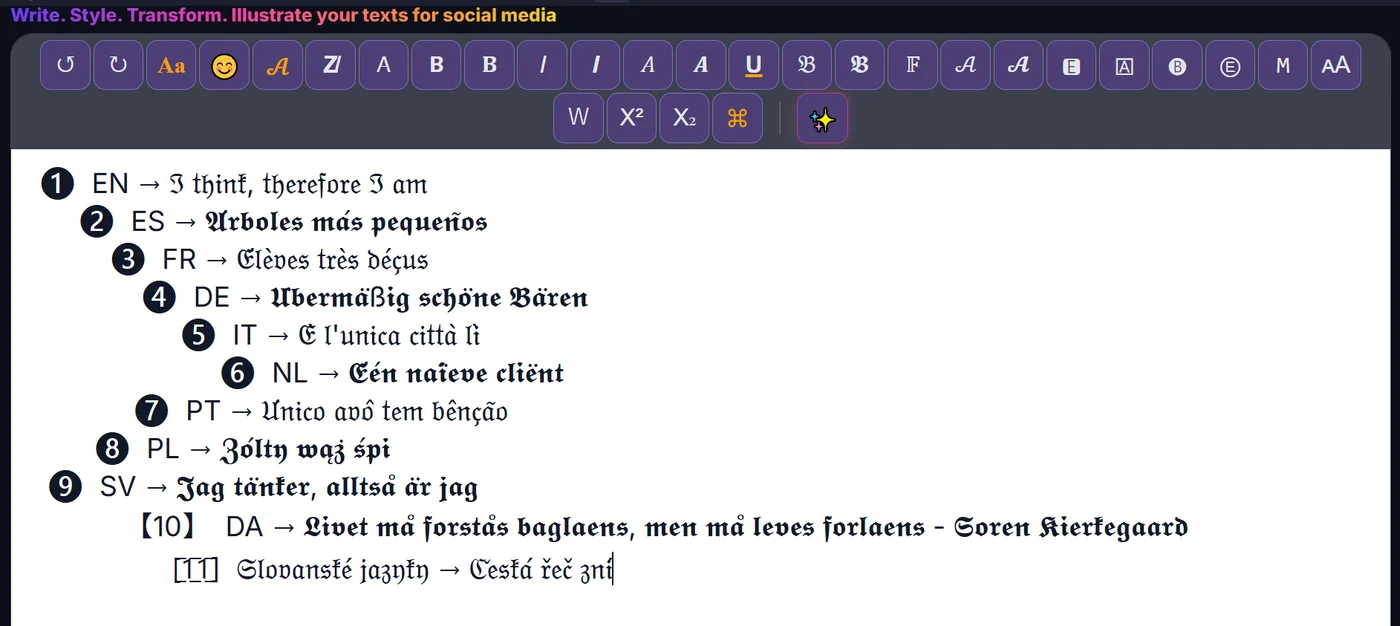
How to make Gothic fonts
- Type or paste your text Write your text in ETeext.
- Pick the style and check it Choose this style; the styled version appears instantly.
- Copy and paste anywhere Copy your styled text and paste it where you want.
Compatibility & Safe Mode
These characters are real Unicode. Safe Mode favours the most widely supported ones — turn it on and your text looks the same everywhere.
Why choose ETeext
-
See it before you paste
WYSIWYG: what you see is what you can use and take anywhere — social networks, messaging, all kinds of apps…
-
As easy as a word processor
The ease of a word processor — for stylish text.
-
Whole paragraphs, many styles
Multiple styles in a whole paragraph — not just one line.
-
Offline-first
Everything stays on your device, even offline.
-
No ads, no tracking
No ads, no tracking. Your text stays on your device — except the optional AI.
Frequently asked questions
Gothic fonts: what is it?
Gothic fonts: styled Unicode characters that look different from normal letters but stay real, copyable text.