
What the “Most used” emojis & symbols feature does
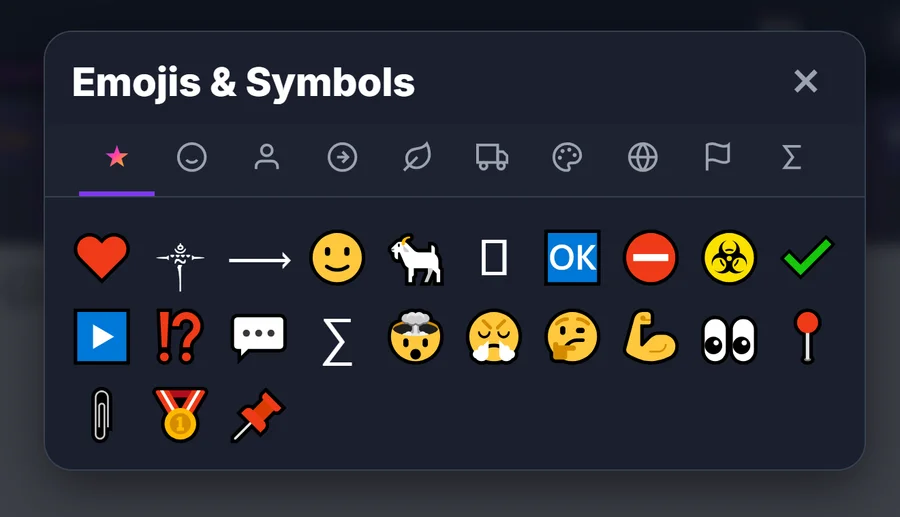
What is it?
In ETeext's Emojis & symbols panel, a tab marked with a star (“Favorites”) automatically gathers the emojis and symbols you use the most. Instead of scrolling through hundreds of characters every time, you find yours at a glance, right at the top.
How it fills up (on its own)
You don't have to tick or pin anything. Every time you insert an emoji or a symbol into your text, ETeext counts it, then shows your characters ranked from most-used to least-used.
At first the tab is empty, with a prompt (“Use emojis and your favorites will appear here.”) — it builds up as you go.
What it's for
Mainly, this tab lets you:
- Save time: your recurring emojis (⭐, ✅, →, ♥…) are available right away, without digging through categories.
- Stay consistent: you easily reuse the same symbols across your bios, signatures, titles or usernames.
- Made for you: the list reflects your way of writing, not a generic ranking.
Where it's stored — and your privacy
This list is saved locally, on your device (in the browser), with no server at all: nothing is sent to the cloud, and it works offline, true to ETeext's “local-first” approach.
- It's specific to this device and browser — it doesn't sync from one phone to another.
- If you clear the browser data (or uninstall the app), the counter resets — no harm done, it rebuilds as you use it.
Good to know
- The tab highlights your most-used emojis and symbols (the very first ones in the list).
- In the free version, PRO-only symbols stay locked even here — without an account, tapping one offers to create one and start the 21-day PRO trial.
- It works alongside everything else: you can style your text and drop in your favorite symbols.